Pyxsoft Antimalware
How Pyxsoft Antimalware protects a cPanel server: real-time scanning, scheduled scans, signatures from Pyxsoft Labs, heuristics, Auto Clean, quarantine and the WHM dashboard.
Pyxsoft Antimalware finds malware in the accounts of a cPanel server and deals with it on its own: it scans every file the moment it is written, runs a full scan of the server on a schedule, and quarantines, cleans or reports what it finds. Everything is managed from WHM → Plugins → Pyxsoft Antimalware.
How the protection works
- Real-time scanning. Every file created or changed in an account is scanned as soon as it lands on disk, whether it came by FTP, a CMS upload, an extracted archive or a malicious script. Malware is stopped before it can run. See Real-Time Protection.
- Scheduled and on-demand scans. A full scan of every account runs on the days and time you choose, with a CPU limit so sites don’t slow down. You can also scan the whole server or single accounts at any time. See Scans.
- Signatures from Pyxsoft Labs. The service checks for new signatures every 6 hours. Pyxsoft Labs publishes them from samples sent by servers, so new malware is covered quickly.
- Pyxsoft heuristics. Files are also analyzed by what they do, so malware with no signature yet is flagged as suspicious. Rules with no false positives on clean software are acted on as malware directly.
- Phishing kits. Kits that collect credentials are recognized, including inside
.ziparchives, and the directory where the kit was installed is shown. - Auto Clean. When malicious code was injected into a legitimate file, only that code is removed and the site keeps working. See Auto Clean.
- Quarantine and allowlist. Isolated files are stored encrypted outside the accounts, where they cannot run, and can be restored if they turn out to be false positives. See Quarantine and Allowlist.
- Email alerts. An email for each real-time detection, a summary after each scan that finds something, and an optional monthly summary. See Settings.
Scanning is incremental: files that haven’t changed are not analyzed again, so repeated scans of the same server finish much faster than the first one.
The Overview
The Overview tab is the first thing you see when you open the plugin. It answers one question — does anything need my attention? — and shows how the protection is doing.
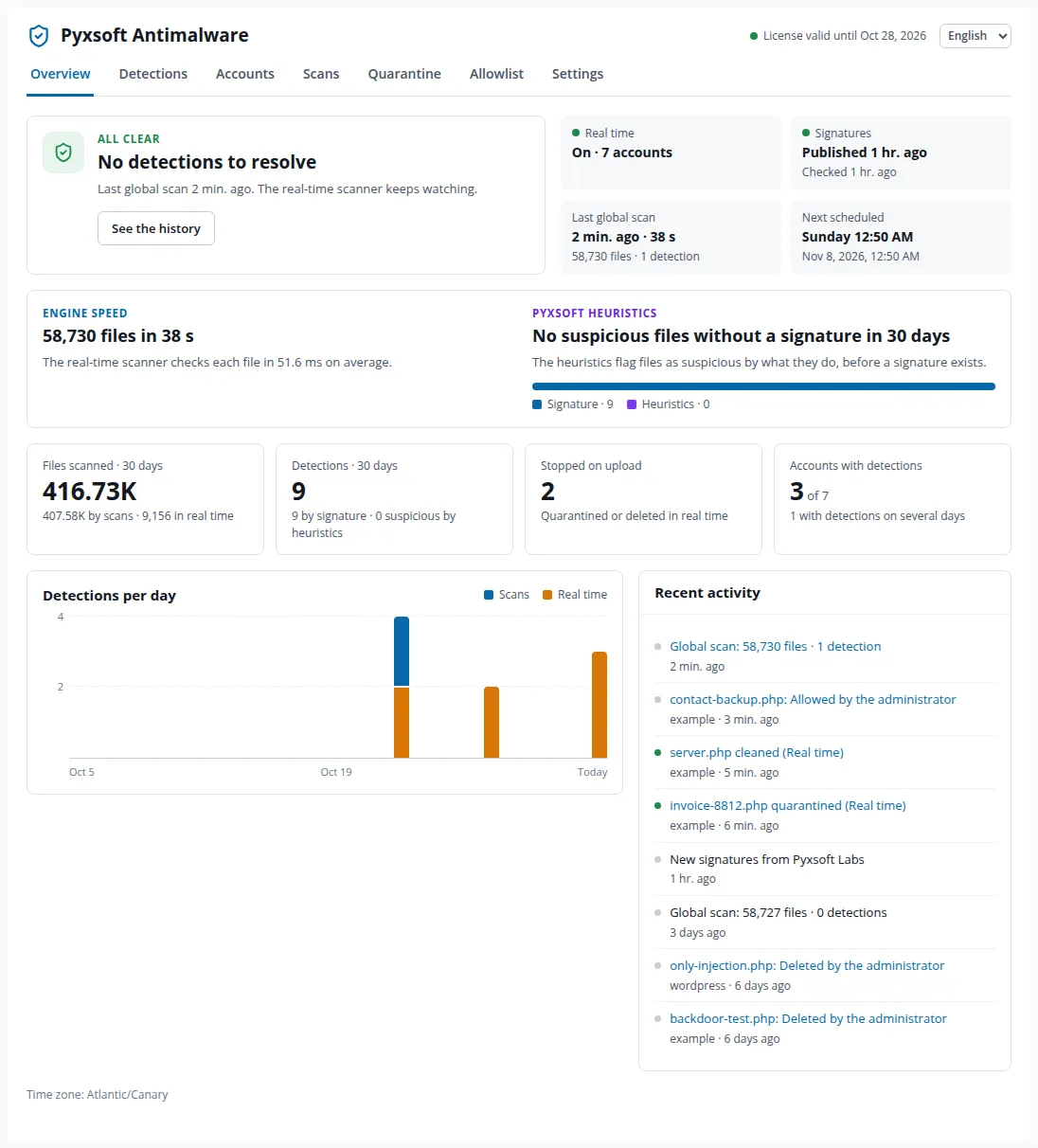
- Needs attention / All clear. The number of detections still to resolve and in how many accounts. When known malware is still on disk (for example because the automatic action is Report only), a button quarantines all of it in one step.
- Status tiles. Whether the real-time scanner is on, when signatures were last published and checked, the last global scan and the next scheduled one.
- Engine speed and Pyxsoft heuristics. How fast the last global scan went and with what CPU limit, the average time the real-time scanner takes per file, and how many suspicious files the heuristics found with no signature in the last 30 days, including how many Pyxsoft Labs later confirmed as malware.
- 30-day counters. Files scanned, detections, files stopped on upload, and accounts with detections. An account with detections on several days is likely being reinfected.
- Detections per day and Recent activity. Each entry in the activity list links to the detection or the scan it refers to.
At the top right, the header shows the license status and lets you switch the interface language (English, Spanish or Brazilian Portuguese).
Sections of the plugin
| Tab | What it is for |
|---|---|
| Overview | Status of the protection and what needs attention |
| Detections | Every file found, with its detail and the actions to resolve it |
| Accounts | State of each cPanel account and per-account scans |
| Scans | Full server scan, schedule and history |
| Quarantine | Isolated files: view, restore or delete |
| Allowlist | Files the scanner skips while their content doesn’t change |
| Settings | Automatic actions, real-time protection, schedule, CPU limit, exclusions, notifications and license |
Everything can also be done from the shell with the pyxsoft command, which is how a server without a control panel is managed.
How the service runs
The service, pyxsoft.service, does not run as root. It runs as its own user, pyxsoft-am, with only the privileges a malware scanner needs:
| Capability | Why |
|---|---|
CAP_DAC_READ_SEARCH |
Read every file, to scan it |
CAP_DAC_OVERRIDE |
Quarantine, delete or clean a file in a directory of another user |
CAP_CHOWN, CAP_FOWNER |
Give a restored or cleaned file back its owner and permissions |
CAP_SYS_NICE |
Give a thread back its priority after a scan |
The unit also keeps the system read-only for the service: /usr, /boot and /etc, and the places from which root runs or installs software, such as /opt, /var/lib, /var/spool and /run. Only the websites (/home, /var/www, /srv…) and its own directories stay writable. It cannot load kernel modules, use setuid programs or create namespaces. Check it with systemctl cat pyxsoft.
| Path | Contents |
|---|---|
/opt/pyxsoft/pyxsoft |
The program |
/etc/pyxsoft-am/pyxsoft.ini |
Configuration |
/var/lib/pyxsoft-am |
Signatures, quarantine, detections and license data |
/var/log/pyxsoft |
Logs |
/run/pyxsoft/rpc.sock |
Local interface, only for root |
If a website lives outside the usual places, it is still scanned, but its files cannot be quarantined there. Allow it with systemctl edit pyxsoft:
[Service]
ReadWritePaths=/data/sitesThis page is also available as markdown.